Check these first: the code is spelled the same in your email and your admin, the discount is active right now in your admin's time zone, the product in the cart is one the discount applies to, and no automatic discount is running alongside it.
1. The code doesn't match what's in Shopify
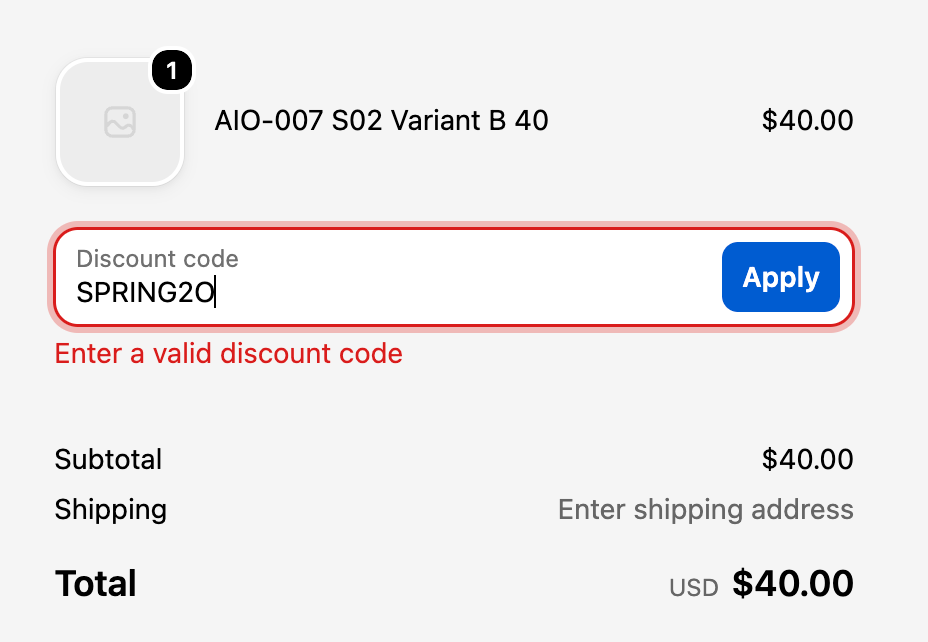
Message: Enter a valid discount code. Start with the simplest check: is the code in the email, banner or ad the same as the code in your admin? SPRING20 against SPRING2O. A trailing space pasted into the email builder. A code renamed after the email was scheduled.
Copy the code straight out of the admin and paste it into your own checkout. If that works, the problem is in how the code was published. More on this message: "Enter a valid discount code" explained.
2. It isn't active yet, or it has already ended
A code with a start date in the future, or an end date in the past, gets the same "Enter a valid discount code" message. Start and end times use the time zone set in your Shopify admin. If your admin is on Eastern time and your sale is meant to start at midnight Pacific, it starts three hours early.
3. The cart has the wrong products
Message: [CODE] discount code isn't valid for the items in your cart. The code exists but is set to apply to specific products or collections, and nothing in the cart qualifies. Usually a promoted product was never added to the collection, or only one variant was selected. Details: "isn't valid for the items in your cart".
4. The cart is below the minimum
A minimum purchase amount or minimum quantity blocks smaller carts. In our test, a 10% code with a $200 minimum, used on a $40 cart, didn't mention the minimum at all. Shopify showed [CODE] discount code isn't valid for the items in your cart, which sends people looking at the product list instead. If the offer says "20% off everything" and the discount quietly needs $50, a shopper buying one $30 item thinks the code is broken. Remove the minimum, or put it in the offer.
5. It has already been used
Message: The [CODE] discount code has already been used. Either the total usage cap was hit, or the code is limited to one use per customer and this customer used it before. Renaming or reactivating the code doesn't reset its history. Details: "has already been used".
6. The customer isn't eligible
Codes can be limited to customer segments, specific customers or markets. A shopper outside those groups can't use it. In our test, a segment code even showed as applied for a guest, then disappeared once an email address was entered. Watch out for segment codes on first orders: Shopify only adds a new customer to a segment after their first completed order. Details: "isn't available to you right now".
7. It can't combine with another discount
Messages: [CODE] couldn't be used with your existing discounts. or Some discount codes couldn't be used together. We applied the best combination. Two discounts only stack if both are set to combine with each other's class. If they can't, Shopify keeps the better-value one. This catches people out most when an automatic discount is running during the sale. See Shopify discount combinations.
8. An app is rejecting it
Discount apps, custom discount functions and some checkout apps can reject a code based on what's in the order. If a code works with an app switched off and fails with it on, the app's rules are the place to look, or its developer. A code can also stay held by a checkout that never finished, if the payment provider didn't report the failed payment back to Shopify.
9. There's no discount box at checkout
Common reasons the discount field doesn't appear: the store has no active discount codes, the customer is in Shop Pay without logging in, or a third-party app has changed the checkout.
10. It applies, but the amount looks wrong
Shoppers rarely report this one, because the code did something. The email promised 20% and checkout took 10%. Work it out from the merchandise: on $100.00 of qualifying products, 20% is $20.00. Then look for the usual reasons the number differs:
- Only part of the cart qualifies. The percentage applies to the eligible items only.
- A better discount won. An automatic discount that can't combine with the code may have been applied instead.
- Order of calculation. Shopify applies product discounts first, then order discounts on the reduced subtotal, then shipping discounts.
- Shipping isn't reduced. Shipping discounts are their own class, so a product or order code doesn't take money off shipping.
- Compare-at prices aren't discounts. The crossed-out price on the product page is a sale price. The code's percentage comes off the selling price.
How to stop a Shopify discount code failing again
Every cause above shows up in a guest checkout, so test one before you send anything: private window, promoted product, code at checkout, desktop and phone. Our pre-launch testing checklist takes about 20 minutes per code.
Or let CampaignCart QA run that checkout for you
It goes through guest checkout on desktop and mobile with your product and percentage code, compares the discount with what you expected, and keeps screenshots. It stops before payment. Currently for US stores in USD and English. 3 free checks per store.
See CampaignCart QA